Your AI agent ships the checkout. The tax work isn't yours
Launch global payments from Cursor, Claude, or any agent. No foreign entity, no tax registration, no compliance code.

Create a payment link for a $29/mo Pro plan with a 14-day trial.
claude mcp add --transport http payments-ai https://mor.payments.ai/api/mcp✓ checkout created- No Foreign Entity Required
- You're not the merchant of record
- Reconciled net payouts
- AI-Ready SDKs & MCP
- VAT and sales tax collected at checkout
- VISA RDR Chargeback Protection
- Auditor-Ready Net Payouts
- No setup fee
- No monthly minimum
- No PCI fee
One command. Then ask for the checkout.
Pick your tool and run one line. You approve once in the browser, with no key to copy, and your agent can build checkouts from that moment on.
Pick your tool, run one line
Every client ends the same way: the server is registered and waiting for you to approve it.
Add to CursorOpens Cursor with the server pre-filled. Approve it in Settings → MCP.
The login step opens the browser to sign in or sign up. Check it with /mcp.
The login step opens the browser. Codex keeps the token in its own credential store.
Run /mcp list inside Gemini CLI to confirm the server is connected.
Then open the Copilot chat Agent picker and approve the OAuth prompt.
For anything not listed. The agent works out its own install path.
Approve once in the browser
Your client opens the dashboard. Sign in, approve the scopes, and the tools appear in the chat. There is no User MCP Key to copy.
Ask for what you want to sell
No API reference, no tax research. Describe the plan and the agent calls create_product, then hands back the hosted checkout URL.
Writing ~/.cursor/mcp.json
"payments-ai": { "url": "https://mor.payments.ai/api/mcp" }
Server added. Approve it in Settings → MCP.
claude mcp add --transport http payments-ai https://mor.payments.ai/api/mcp
claude mcp login payments-ai
Added payments-ai. Opening browser to authorize.
codex mcp add payments-ai --url https://mor.payments.ai/api/mcp
codex mcp login payments-ai
Added payments-ai. Opening browser to authorize.
gemini mcp add --transport http payments-ai https://mor.payments.ai/api/mcp
Added payments-ai (http)
code --add-mcp '{"name":"payments-ai","type":"http","url":"https://mor.payments.ai/api/mcp"}'
Registered payments-ai for Copilot agent mode
Install the Payments AI MCP server here using OAuth.
Detected client · writing its MCP config
Added payments-ai (http)
Opening browser for authorization…
Signed in · scopes approved
get_my_merchant
0 merchants · ready to create one
Create a $29/mo Pro plan with a 14-day trial and give me the checkout URL.
create_merchant_account ✓
create_product ✓
checkoutUrl → …/payment/pln_4Rk2mBpA?isSandbox=true
payments-ai registered · awaiting approvalOAuth complete · 12 tools availableSandbox checkout · tax handled by the merchant of record
Under two minutes, start to finish.Read the MCP docs (opens in a new tab)
A gateway moves money.We take the liability.
With a raw gateway, every tax filing is yours. Here, none of them are.
Raw gateway
e.g. Stripe, Braintree
- Setup:Weeks of API docs and webhooks
- Tax & VAT:You register, file and remit
- Liability:You're the seller on paper
- Chargebacks:You build every dispute case
Payments AI
Merchant of record
- Setup:One MCP command. Your agent wires it.
- Tax & VAT:Collected and remitted for you. US, EU, UK.
- Liability:We're the seller of record. Not you.
- Chargebacks:We answer the card networks for you.
Dispute fees and chargeback amounts still pass through to you.
Your Brand, Our Technology. Zero Code.
An illustrator, an indie SaaS and a running coach. Same checkout, three brands: each set a logo, colors, a font and an input style.
No code. Taxes stay on us.
Inkwell checkout by Maya Chen: light mode, background #FCE7D6, button #C2410C, font color #431407, Roboto font, rounded inputs. It sells Brush Pack Vol. 2, total due $28.80.

Wondering if this is for you?
Discover what else we offer. Our tools are built for different business goals, not different budgets. Let's find your match.
You keep shipping.
The tax work isn't yours.
Behind the AI-friendly APIs is full merchant-of-record infrastructure. Every transaction is legally sold by the merchant of record, which registers, files, and remits the transaction taxes.
Automated Global Tax
VAT, GST, and sales tax calculated and collected at checkout. Collected and remitted for you across the US, EU, and UK. Your agent doesn't need to know any of it exists.
Chargeback handling, run for you
The merchant of record files chargeback and fraud responses with the card networks. You may be asked for evidence on the underlying sale, and dispute fees and chargebacks are debited from your balance.
Plug-and-play Subscriptions
Recurring billing, dunning, proration, and upgrade flows, ready from day one. No extra code, no extra lawyers.
Auditor-Ready Reporting
Reconciled net payouts and compliance-ready records, filed under the merchant of record. No manual bookkeeping, no year-end scramble.
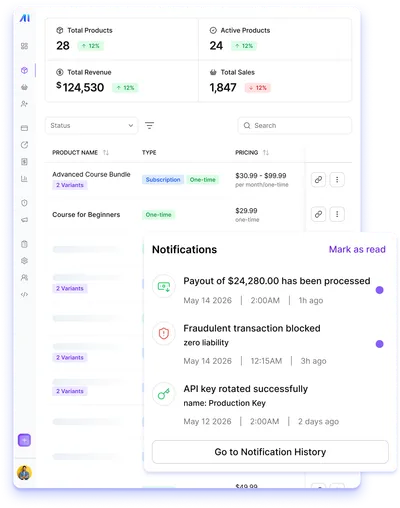
One connection. Global payments handled
Point your coding agent at the hosted MCP server. It creates the merchant, the product, and the plan, and hands back a hosted checkout link. Sales tax and VAT are calculated and collected at checkout, so there is no compliance research to do.
- Hosted server: nothing to install, no package to keep updated
- OAuth in the browser, no key to copy
- Sandbox first: test checkouts need no identity verification
- Works in Claude Code, Cursor, Codex, Gemini CLI, and more
# Connect once, then approve the sign-in in your browser
$ claude mcp add --transport http payments-ai \
    https://mor.payments.ai/api/mcp
$ claude mcp login payments-ai

// Ask: "Create a $29/mo Pro plan and give me the checkout URL."
get_my_merchant()
create_merchant_account({ name, email })
create_product({
  merchantId,
  name: 'Pro',
  plans: [{ name: 'Monthly', amount: 29,
    currency: 'usd', type: 'recurring',
    billingPeriod: 'month', periodLength: 1 }],
})
// → sandbox checkoutUrl (stays sandbox)

// When you say so
go_live({ merchantId })
// live starts empty: create_product again for a live checkoutUrl
 █
The questions developers
ask before going live.
claude mcp add --transport http payments-ai https://mor.payments.ai/api/mcp and then claude mcp login payments-ai, and approve the sign-in in your browser; there is no package to install and no key to copy. Cursor, Codex, Gemini CLI, VS Code, Grok, and ChatGPT connect to the same URL. Your agent then calls tools such as get_my_merchant, create_merchant_account, create_product, list_products, update_checkout_customization, and go_live. You describe what you need in natural language (e.g. "add a checkout for my $49/month Pro plan"), and the agent creates the merchant and the product, then hands back a hosted checkout URL with tax collection handled by the merchant of record. If you prefer not to use code, the checkout builder in the dashboard lets you set your checkout colors, fonts, and logo.Running a marketplace or SaaS platform?
Meet Payments AI Platforms.
If you're orchestrating payments for many sub-merchants rather than a single app, our AI-routing platform maximizes approval rates and recovers revenue across every gateway you connect.
Explore Payments AI PlatformsNeutralize malicious card-testing scripts at the entry point.
Sub-200ms routing decisions and waterfall retries to recover sales.
Pass Level 2/3 data to slash fees by 33%.
Maximize data depth to boost authorization rates to 70%.
Ready to monetize
your AI app?
Connect your agent and start selling in minutes. Sales tax and VAT are calculated, collected, and remitted by the merchant of record from the first transaction.
No credit card required · Under 5 minutes from signup to a working sandbox checkout · Identity verification required before payouts (live merchants can process up to $5,000 first)